♨️ How To Guide : Changing CSC for free using SamFW Tool | No Root required! - A brief guide!
♨️ The step by step guide process which worked for me is as follows:
STEP 1: Click here - https://samfw.com/SamFwToolSetup_v5.4.zip- to download the latest version of SamFW tool.
STEP 2: Remove the sim card and connect your phone to a computer and make sure the phone's drivers are installed.
STEP 3: Unzip the downloaded file. Right click on the file SamFwFRPTool.exe and 'Run as Administrator'.
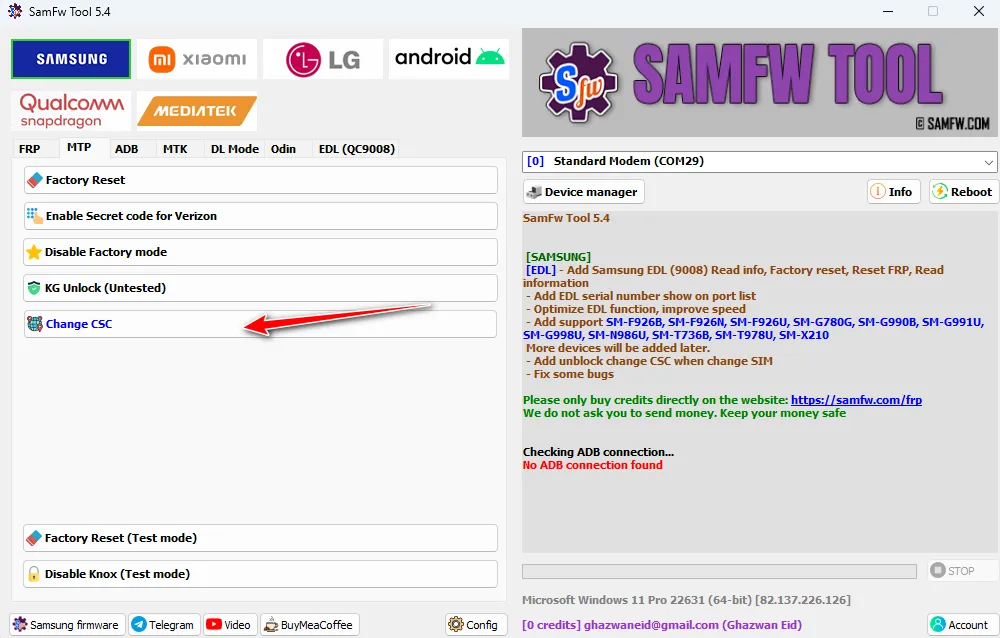
STEP 4: After the software opens, make sure your phone is detected before proceeding. If its detected, click on ADB tab in the software.
STEP 5: In your phone, go to developer options and enable 'usb debugging'.
STEP 6: In your phone, open phone dialer and type *#0*# to get into test mode. Leave the phone unlocked and keep it aside now.
STEP 7: Click on 'Change CSC' button in the ADB tab of the tool. Now the tool will connect to your phone, check and list the available CSCs which your phone model supports as shown in the pic attached.
STEP 8: Choose a CSC which you wish to change to from the drop down menu in the pop-up window as shown in the pic attached.
NOTE: The tool also has the option to force the phone to accept a CSC not listed/supported as well by manually entering the same. However, I would not recommend doing it if you really wish to get OTA updates and also to evade any unforeseen issues. I must admit, I haven't frankly tried this and do not know what lies in the pandora box to be honest.
STEP 9: After choosing the CSC from the drop down, the tool quickly connects to the phone, changes the CSC and restarts the phone.
STEP 10: After the phone restarts, unlock the phone using your pin/password, insert your simcard, check the change of CSC in software information, disconnect the phone from the computer and also disable the 'usb debugging' in the developer options.
That's it! All done. Phone restarts with the new chosen CSC and the related features will now be active!
♨️ Source: XDA Developers
Comments
Sign in to comment