📢 Oppo Demo Mode Unlock Tool Pro 2026 Free📢
✅Download Tool:
https://mega.nz/file/vlMGGD5A#u0Qxrs_kAsZh1Ulu-86dgA3cra6G1JoBY_2rTpPfiD8
📢 How to Remove Demo Mode (Step-by-Step) 📢
✅ Step 1: Turn on USB Debugging
Open phone Settings
Go to About Phone
Tap Build Number many times
Enable Developer Options
Turn on USB Debugging
✅ Step 2: Connect the Phone
Use a good USB cable
Connect phone to Windows computer
✅ Step 3: Open the Tool
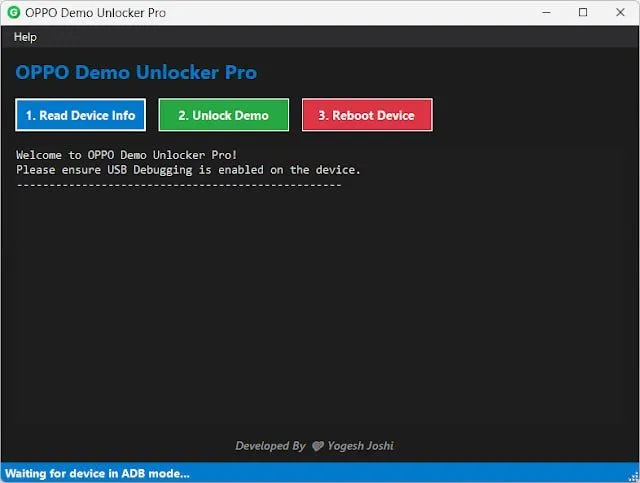
Run OPPO Demo Unlocker Pro on your PC
✅ Step 4: Read Device Info
Click "Read Device Info"
Make sure your phone is detected
✅ Step 5: Unlock Demo Mode
Click "Unlock Demo"
Wait for a few seconds
✅ Step 6: Restart Phone
Click "Reboot Device"
After restart, Demo Mode will be gone
✅✅✅✅✅✅✅✅✅✅✅
All Done. Your OPPO Device is ready for normal use.
Comments
Sign in to comment